
Shop · Search Console Report Pack
Explain your SEO results to the board without building the report from scratch
Turn two periods of Google Search Console data into plain-English explanations of what rose, what fell and what needs a closer look. Built-in checks help you avoid misleading comparisons.
For MDs and marketing leads at UK NetSuite and ERP partners. You type the figures in; it doesn’t connect to Search Console.
£15 one-off · Excel and Google Sheets · about 30 minutes a month after setup
Instant download. Already own Found? This pack is included.
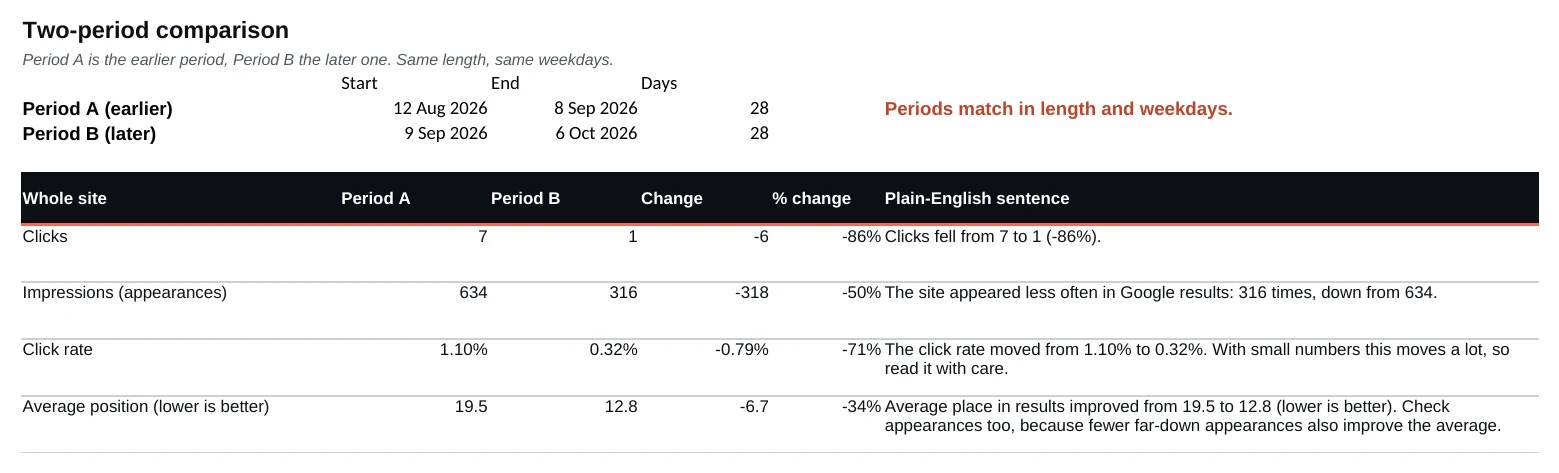
Example Search Console report: our own site

| Figure | In plain English |
|---|---|
| Clicks | Fell from 7 to 1 (-86%). |
| Impressions | Down from 634 to 316. |
| Click rate | 1.10% to 0.32%. Small numbers move a lot, so read with care. |
| Average place | Improved from 19.5 to 12.8 (lower is better). Fewer far-down impressions also improve the average. |
The lesson: a better average place does not necessarily mean more traffic or more business, and the report says so.
Our own small site, so a few clicks look dramatic.
What a plain Search Console export won’t do for you
- It reports what went down next to what went up. A report that only shows gains stops being believed.
- It translates the jargon. Impressions are not people. Clicks are not enquiries.
- It counts moved pages at both addresses. Counting only the new one overstates the gain.
- It says what the figures cannot show. Search Console does not prove cause, enquiries or revenue.
What’s in the SEO reporting template
- Measurement Report (Excel). Writes a sentence for each figure and warns when the periods differ in length or start day.
- 10 checks before you share, for the mistakes that flatter or hide results.
- Before and After Log (Excel), so you know what went live and when.
- A short PDF guide with two real, anonymised reports.
You need: Search Console already collecting data, and Excel, Google Sheets, LibreOffice or Numbers.
Who it’s for
MDs and marketing leads at UK NetSuite and ERP partners. Not for anyone who needs figures pulled in automatically, or enquiries and revenue measured.
How you get it
Pay by card through Stripe and download straight away. Links work for 48 hours; email hello@artifexa.co.uk for a fresh one. UK billing addresses only. No VAT: we are not VAT registered.
FAQ
Do I need Search Console?
Yes. It only collects data from the day it is added.
What do I receive?
The Measurement Report and the Before and After Log spreadsheets, plus a PDF guide with two real anonymised reports.
Excel or Google Sheets?
Both, plus LibreOffice and Numbers. No macros.
What can’t Search Console tell me?
Enquiries, revenue, or what caused a change. Impressions are not people, and clicks are not enquiries.
Instant download · licensed for use within your own firm.
Included in Found. Need to find out why the numbers moved and what to fix? Found, the ERP SEO playbook, adds the diagnosis and a 30-day plan.
Other free tools: the AI search readiness checker, the Enquiry Leak Finder and a Visibility Review.