
Shop · ERP Buyer Prompt Pack
Find the buyer questions where AI recommends your ERP competitors instead of you
Test how AI assistants answer real buyer questions about NetSuite and ERP services. Record when your firm is named, cited or recommended, see which competitors appear, and find the questions your website needs to answer better.
£19 one-off · 25 buyer prompts · five AI engines · instant download
Excel and Google Sheets. No paid AI accounts needed. Allow about two hours for your first test.
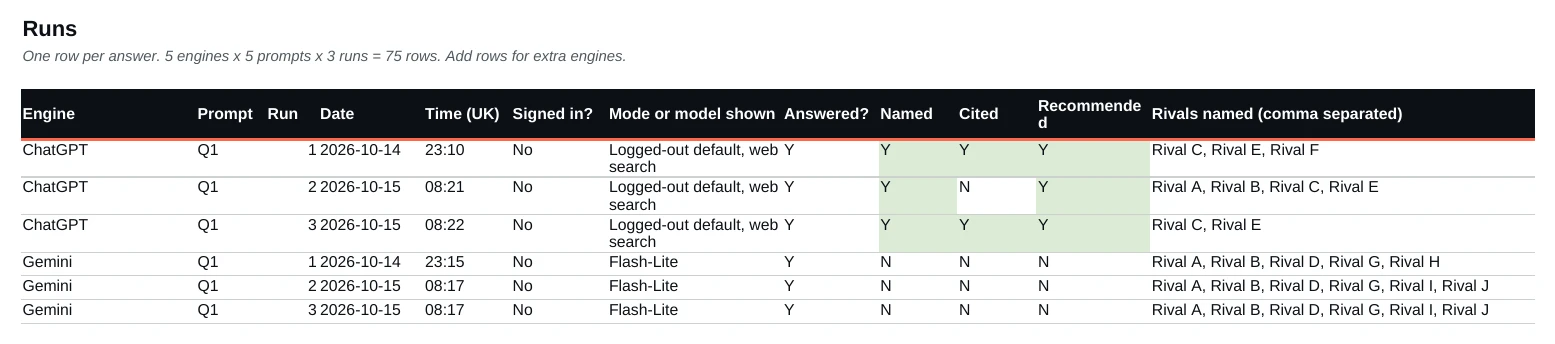
What the test tells you, question by question
- Named: does the answer mention your firm at all?
- Cited: does it link to your own site as a source?
- Recommended: does it shortlist you, or just mention you?
- Rivals: which competitors it names instead.
A question that keeps naming competitors but never you points to a content gap worth investigating. It is not proof that a missing page caused the result.
A real result
A UK NetSuite rescue consultancy was named in 8 of 88 AI answers, all from ChatGPT. Its two most-named rivals were each named in 48. These are counts of answers, not market share.
Read the full case study: prompts, engines, method and limits
How to run the test
- Choose 5 of the 25 buyer prompts.
- Ask each one 3 times on each of 5 free AI engines, signed out where you can: 75 answers.
- Record who was named, cited and recommended. The scoreboard tallies it.
- Write a page for each question that misses you, then re-test.
What you need
- The free versions of the AI tools. No paid accounts.
- Excel, Google Sheets, LibreOffice or Numbers. No macros.
- About two hours the first time.
What you get
| File | What it does |
|---|---|
| Buyer Prompt Library (Excel) | 25 buyer prompts, so you test what buyers ask, not how you describe yourself. |
| AI Answer Scoreboard (Excel) | Tallies named, cited, recommended and rivals for you, and gives you a baseline to re-test against. |
| Guide (PDF) | Explicit scoring rules, a worked example, and versions for Sage, Business Central and Acumatica. |
Who it’s for
UK NetSuite, Sage, Dynamics and Acumatica partners.
How you get it
Pay by card through Stripe and download straight away. Links work for 48 hours; email hello@artifexa.co.uk for a fresh one. UK billing addresses only. No VAT: we are not VAT registered.
FAQ
Do I need paid AI accounts?
No. Use the free versions, signed out where you can.
Which software do I need?
Excel, Google Sheets, LibreOffice or Numbers. No macros.
Does it work for Sage or Business Central?
Yes. The guide adapts the key prompts for Sage, Dynamics 365 Business Central and Acumatica.
Can I use it for client work?
No. It is licensed for use within your own firm only, not for resale or client work.
Is there a guarantee?
No. The pack shows what AI assistants say on the day you test. Nobody can guarantee that AI will name your firm.
Excel and Google Sheets · instant download · about two hours the first time · licensed for use within your own firm.
Included in Found. Need help deciding what to fix once you have results? Found, the ERP SEO playbook, adds a ranked 30-day plan.
Other free tools: the AI search readiness checker, the Enquiry Leak Finder and a Visibility Review.